
Superblock v3.1 has now been merged into the dev branch of the official addons repository, and is available for testing.
This release introduces the ability to set an expiration time for channel blocks. This means that you can block a channel for a specific duration. After the block expires the channel will be unblocked, and posts from the blocked channel will be available again.

A huge thanks to the NLnet NGI0 Commons Fund for sponsoring the work on this release!
New features and UI changes
Superblock v3.1 also brings some necessary UI changes to facilitate the new functionality.
The entry in the avatar menu of a post has been renamed from "Block permanently" to the now more appropriate "Block channel…":
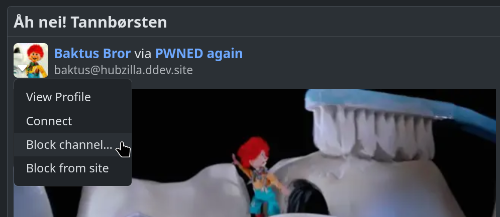
Blocking a channel via the avatar menu of a post.
As indicated by the elipsis after the entry, this now opens a dialog that lets you specify the duration of the block:
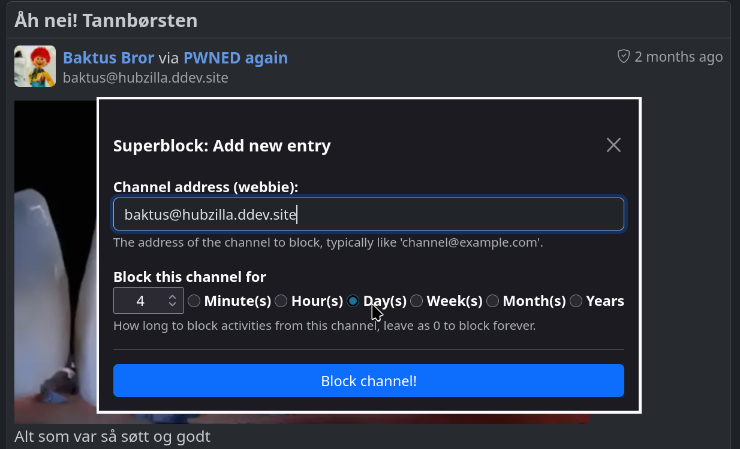
Setting a duration for how long a channel should be blocked in the new channel block dialog.
To block the channel permanently, just leave the duration at zero. This is the default, and you just need to click the "Block channel!" button. Setting a duration will record the expiration time with the block, and once the time is reached the block will no longer be active.
As part of the update, the block list view also got some visual improvements. The "Add new entry" functionality has now been moved to a button in the module title, and will reuse the same dialog used by the avatar menu in the network stream.
A new icon for editing the entries of the block list has also been added to each entry, and the link to visit the blocked channel has been moved to an icon as well. Finally, the icons have been adjusted a bit, and use the standard Hubzilla visual representations.
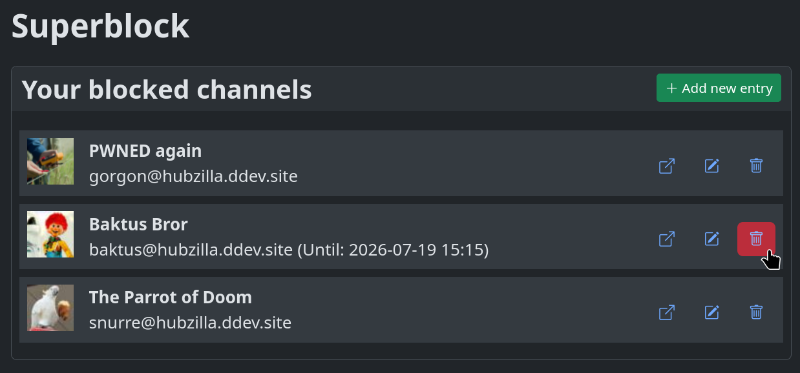
The updated block list view showing the new icons and visual cues.
Also note that entries with a set duration will list their expiration time. Entries will not be removed from the list when expired, but will no longer be active and blocking the channel.
Availability
The release is available, and ready for testing in the dev branch of the official addon repo now. The new features will be made available to hubs running on the stable release branch with the next Hubzilla release.
Call for translators
The addon has some new and changes strings for this release, in addition to some updates to the documentation. If you would like to help with translations to your language, please get in touch via the Hubzilla documentation team forum, or with me directly.
Outstanding issues/Future work
The way Superblock works is that it hooks into the rendering pipeline of Hubzilla, and filters the items before they are displayed. This has some unfortunate side effects. Most notably that you may still get notifications about activity from blocked channels, and that activity from blocked channels reappear when the block expires or is deleted. Even activities posted when the channel was blocked!
In other words, the activities themselves were never really blocked — they were just not displayed to you. When adding a permanent block this does not matter all that much (apart from the notification issue.) However, with the option of setting an expiration time for the blocklisting this issue becomes a lot more important.
Fixing these issues will be the focus for the next release of Superblock.