
Superblock version 3 is almost a complete rewrite of the Superblock addon for Hubzilla. This release brings a refreshed UI, translations, improved performance and security, more consistent interaction, a comprehensive unit test suite, and the ability to add channels manually to the block list. It also fixes a long standing issue, and provides a solid foundation for further enhancements to come.
Superblock is an addon for Hubzilla that allows people to permanently block other channels they do not want to see any posts from. It's an important tool for giving users the ability to moderate their timelines, and control who they want to see in their streams. It's part of the official addons maintained by the Hubzilla project.

A huge thanks to the NLnet NGI0 Commons Fund for sponsoring the work on this release!
Quick recap: How Superblock works
The goal of the Superblock addon is to be as little in the way as possible, and as such there's not all that much UI to deal with. The main interaction points is when you see a post from someone you want to block in your network or public streams, and when visiting the Superblock addon page itself.
The normal way of blocking a channel is to click their profile picture on a post or comment, and then select "Block Completely" from the popup menu that appears.
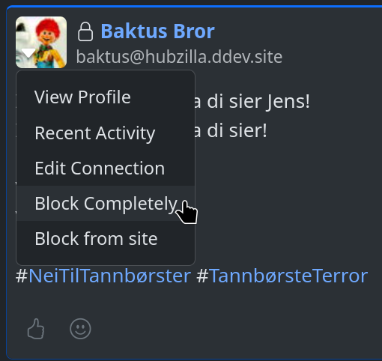
Clicking the profile picture of a post shows a popup menu where you can select to block the poster from appearing in your streams and timelines.
If you're a site admin, you will also see a choice that allows you to block the poster from the entire site. This means nobody on your site will see any future posts or comments from this poster.
You can view which channels you have blocked, and optionally remove them from the block list by visiting the addon page directly. You get to this page by clicking the addon icon in the list of installed apps, or if you have added it to your navigation menu, by clicking on the Superblock entry there.
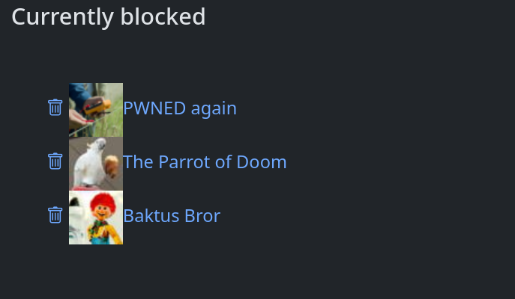
The Superblock addon page allows you do view and modify the list of blocked channels.
What's new in version 3.0
Refreshed UI

The refreshed Superblock addon page in version 3 of the addon.
In version 3.0 I have cleaned up the visual appearance, updated the headlines and other text, and also added some improvements. The thrash can icon was made bigger and more prominent, and the channel address was added to the entries. The latter is useful to be able to separate different channels that may operate under the same display name. Especially when dealing with channels from systems that don't support nomadic identities.
I also added an initially collapsed form for adding new members to the block list manually. More about that later.
Translations
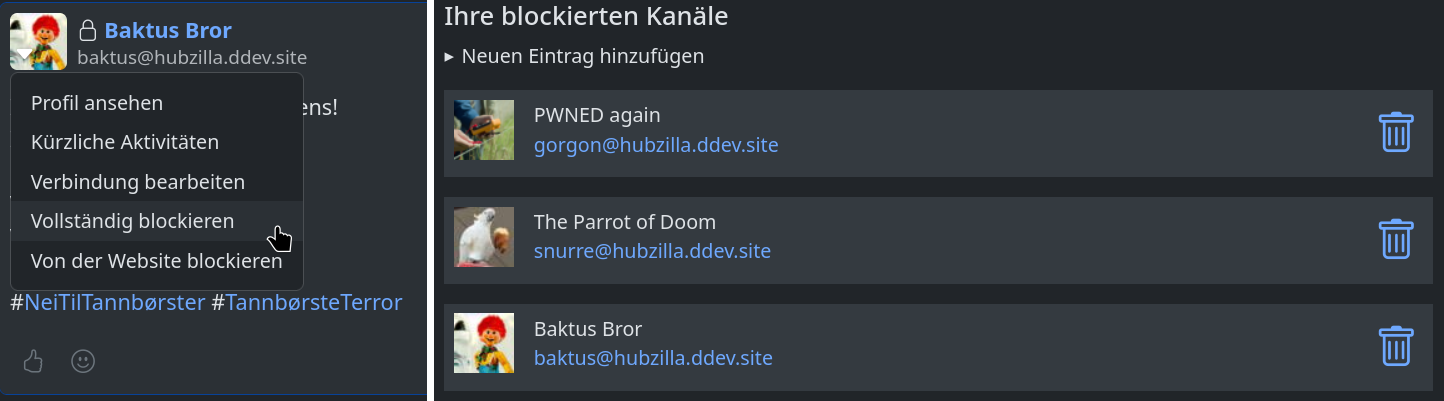
The Superblock UI elements in German.
Previously the strings for the addon was translated via the main language files of the Hubzilla core project. While official addons and all, I find this to be a bad practice that causes an unnecessary dependency on the core project from the addon.
So for this release I have moved the translations to the addon itself. This makes translating the addon a much simpler task, and it makes sure we can keep the translations consistent without having to rely on the core project. At release, the addon ships with translations for Norwegian Bokmål, German and Hungarian. The last two thanks to @pepecyb@hub.hubzilla.hu. I hope to be able to add more translations with the help of the community going forward.
Translations can be easily performed using POEdit, Lokalize or other standard translation tools.
Manually adding channels to the block list
A section for manually adding channels to the block list was also added. This section is initially collapsed, but when clicked, it will open a form that allows you to type in a channel address to add to the block list. See the video clip below:
Also note that notifications for the operations appear as they should. Previous versions would only display the notifications once you went back to the network or HQ pages.
One caveat is that currently it is only possible to block channels that the Hubzilla instance already knows about. This is because we don't block by channel address, but by nomadic identifiers1. These are not known until the hub has had at least some interaction with the channel to block. I plan to address this shortcoming in a later update.
Improved performance and security
Addons in Hubzilla work by registering handlers for "hooks" that are invoked at specific times during request processing. People familiar with how WordPress extensions work will recognize this as a similar approach.
Superblock registers handlers for a number of hooks, some which are invoked quite frequently. One example is the stream_item hook, which is called for every post when rendering a timeline or stream.
The way this used to work, Superblock would fetch and populate the block list from the local channel configuration for each post or comment in the stream. While the database lookup for the configuration itself was cached, the rest of splitting the data and populating the block list was repeated for each invocation.
In version 3 this is no longer the case. We now load and populate the block list only once for each local channel during the request. Care is taken to ensure that block lists from different channels are not mixed, in cases where the block list for more than one channels are required within the same request.
The way action requests are handled have also changes significantly. Where actions previously was handled mainly as GET requests to the addon with the action to perform and data needed as query parameters, all requests have now been moved to POST requests, and can be performed either via standard HTML forms or via asynchronous JSON requests.
This reduces the potential for leaking information in server logs, shady ISP's or VPN providers, and also makes performing actions from JavaScript more convenient. This again leads to a smoother experience for the user.
All actions are now also protected by CSRF tokens, making it less likely that an attacker can modify your block list on your behalf. Validation and sanitization of the input parameters have also been tightened to prevent invalid or incorrect data to find it's way into the block list.
More consistent interaction
In addition to mainly using asynchronous JSON requests for interacting with the addon, it also make use of the standard Hubzilla notification system to notify the user of success or failure after an operation. Notifications are now also displayed also in the Superblock addon page itself.
This was somewhat inconsistent before, and notifications were not displayed at all on the Superblock addon page. The messages have also become more specific to the operation performed, instead of the previous less descriptive "Superblock settings was updated."
A comprehensive test suite
When working on refactoring an old code base like the Superblock addon, it's really easy to inadvertently break existing functionality. So my first steps when starting on this project was to add a suite of automated tests to cover most of the functionality, and exercise how the addon reacts to different input.
During this step I also discovered a number of edge cases that was not covered by the existing addon. Together this then provided some guidance on how to proceed with the refactoring.
However the most valuable aspect of the test suite is that it provides a safety net to ensure functionality is not broken when features are added or changed. As a bonus it can also provide some documentation on how we expect the code to respond to different inputs.
The addon tests are currently not being run by our CI system hosted by Framasoft on their Framagit server, but this is planned for the near future.
We use PHPUnit to run the tests, and rely on the Hubzilla core projects PHPUnit configuration to find and run the tests. This meant I also had to make some changes to the core project before adding tests to the addons. Also to facilitate testing JSON requests, a helper method was added to the module test case base class. Finally, for some tests I needed to load extra database fixtures for the test, so I had to make the API for loading individual fixtures public in the Hubzilla core base test class.
The test suite will be important also for the future work on the Superblock addon.
Bug fixes
A long standing issue has been that reshared posts from blocked users still would be visible in the network stream. In other words, if a channel A has blocked channel C, but another connected channel B reshares a post from C, the reshare would be visible to A.
This has been fixed in version 3.0, so the post containing the reshare will be hidden.
Unfinished business
There's still a lot of work planned for the Superblock addon. An updated overview is found on the project wiki page. I'd still like to mention a few items specifically.
Documentation
Currently there's no way for an addon to provide it's own documentation to the Hubzilla help system.
I have still added some brief documentation in the doc/ sub directory of the addon.
The hope is that this can be picked up by the Hubzilla help system sometime in the future.
The documentation is available in the same languages as the UI strings mentioned above.
Adding unknown channels to the block list
As mentioned above, we can only add channels known to the hub to the block list. To make the block list more useful as a proactive tool, it is necessary to find a way to add also currently unknown channels to the list.
How to do this requires a bit of thinking, which is why I did not immediately include it in this release. Anoher part of the reason is some further feature requests from the community, listed in the stretch goals on the project wiki page.
Configuring the addon
As the feature set of the addon grows, there will probably be a need for a way to configure how each user wants it work for them. I am unsure about what the best way to achieve this will be, but plan to solve this when adding features that will need configuration options.
Availability
Superblock version 3 will be made available with the next release of Hubzilla, version 11.2. The adventurous can try it already now by checking out the dev branch of the official addon repo.
-
A nomadic identifier is independent of the server a channel is hosted on, and it will be the same for all clones of the channel. Even when the original channel has been moved, and no longer exists on where it was first created. ↩